
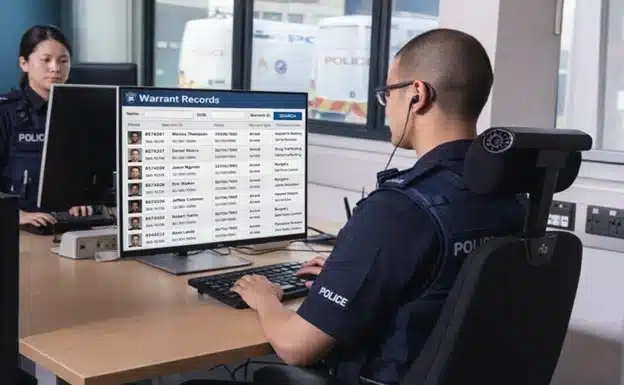
Police officers face unknown risks during every traffic stop. A routine speeding incident could involve a wanted person. Even a minor car accident might reveal someone with serious warrants. Responding to a suspicious vehicle could mean encountering a fugitive.
Warrant checks are the intelligence backbone of safe police encounters. Before approaching a vehicle or making contact with a subject, officers need to know: Does this person have outstanding warrants? Are they wanted for violent crimes? Should the officer request backup before making contact?
In the past, warrant verification required radio calls to dispatchers, which resulted in 3-5 minute delays while officers waited vulnerably at roadsides. Modern warrant check systems provide instant intelligence directly to officers’ mobile devices reducing the response time from minutes to just a few seconds.
This guide explains how police perform warrant checks from NCIC database architecture to mobile query technology and how modern platforms lead to faster and safer warrant verification.
What Is a Warrant Check in Law Enforcement?
A warrant check (also known as a warrant lookup or warrant query) refers to the process of searching through criminal justice databases to determine whether an individual has active warrants.
Officers review the person’s name, date of birth, and additional identifiers like Social Security number or driver’s license number.
The main goal of a warrant check is to authenticate the identity of an individual to see if there’s a legal authority to detain, arrest, or take any further law enforcement action.
Types of Warrants Checked
Courts issue different types of warrants depending on the situation, including arrest warrants, search warrants, bench warrants, and so on.
- Arrest warrants: This is the type of warrant that’s issued by a judge upon finding probable cause that a crime was committed. Arrest warrants authorize law enforcement to take the person of interest into custody.
- Bench warrants: Issued when an individual fails to appear in court, violates a court order, or ignores a judicial directive.
- Probation/parole violation warrants: Issued when an individual on probation or parole allegedly violates supervision conditions, allowing law enforcement to detain them for further court action.
- Federal warrants: Issued by courts at the request of agencies like the FBI, DEA, ATF, or U.S. Marshals. These allow law enforcement to make arrests or conduct searches for serious federal crimes.
- Out-of-state warrants: Interstate warrants are authorized in one jurisdiction but can be enforced in another. They’re usually transmitted and verified through Nlets, and enforcing them across state lines typically requires following extradition laws.
- Extraditable vs. non-extraditable: Warrants that indicate whether the agency that issued the warrant is ready to extradite the subject across jurisdictional borders.
When Officers Check Warrants
Checking for warrants is generally conducted during routine and high-risk law enforcement activities, including:
- During traffic stops, officers must pull the driver over as part of warrant checking, standard safety procedures, or legal protocols.
- Before executing search warrants or arrests, officers should verify the target’s legal status, which involves validating their identity to ensure they’re authorized to detain the perpetrator.
- During field interviews and investigations, it’s important to execute warrant checking in order to determine whether an individual is wanted or has a criminal history that may pose a safety risk.
- At accident scenes involving drivers, officers should check for warrants first on the involved drivers or passengers to validate outstanding legal obligations (allowing them to secure suspects) and request medical clearance.
- During 911 responses, officers are expected to identify the subject early and request real-time warrant checks to reduce the risk of escalation and stay alert to potential threats.
- Before releasing an individual from custody, officers must confirm there are no active warrants to prevent accidental release of wanted individuals.
Warrant checks are a fundamental part of officer safety and a core legal duty. Skipping them can mean letting wanted individuals walk free and may raise the risk of officer ambush scenarios.
Traditional Warrant Check Process
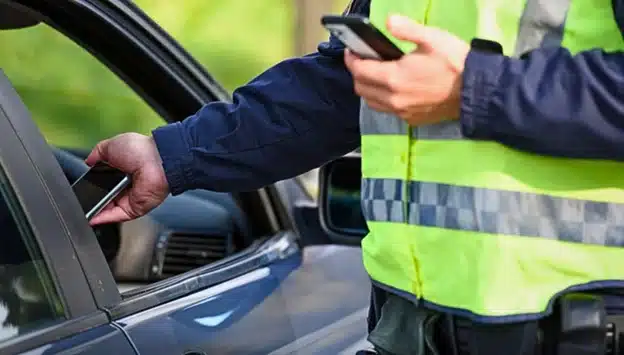
Officers often relied on a dispatcher-mediated process before to verify warrants. Here’s what officers used to do during traditional warrant checks.
Step-by-Step Traditional Process
1. Officer Initiates Contact
The officer conducts a traffic stop and engages with the subject to collect identifying information while observing the situation from the patrol vehicle. The officer then radios the dispatch with basic information, establishing the first link in the verification chain.
2. Radio Request to Dispatcher
During this step, an officer sends a radio message to dispatch. For instance, they can say “Unit 5 to dispatch, 10-28 and 10-29 on John Smith, DOB 5/15/1985, Driver’s License Texas ABC123456,” which serves as his request for a warrant check and driver’s license identification. If the radio channel is occupied during this exchange, it could delay critical communications.
3. Dispatcher Manually Queries NCIC
The dispatcher inputs the subject’s name and date of birth into the NCIC database. Multiple sources are checked, which include wanted persons files and state-level warrant databases. The dispatcher will thoroughly review the returned results to search for matches.
4. Dispatcher Relays Information
If a warrant exists, the dispatcher radios back to the officer, saying, “Unit 5, subject has active felony warrant, aggravated assault, Tarrant County, extraditable.”
But, if there’s no warrant found, the message would be: “Unit 5, clear on warrants.” The officer receives this intelligence via radio, often while remaining vulnerable at the scene.
5. Officer Responds Based on Information
If a warrant is found, officers may request backup, adjust their approach tactics, and execute the arrest. If no warrant is found, the officer continues with standard traffic enforcement or investigative procedures.
Traditional Process Timeline
Dispatcher-mediated warrant checks are time-consuming. Here’s a breakdown of how long each step generally takes.
- Radio request: Takes about 30 seconds to transmit subject information.
- Dispatcher query and review: Urgent requests last 10 minutes to manually search NCIC and state databases, confirm matches, and review details.
- Radio relay: Lengthy transmissions need to be broken into 30-second intervals with 2-3 seconds of pause before the next radio transmission.
Traditional warrant checks typically take three to five minutes, but in fast-moving, high-risk situations, that wait can feel much longer. Every minute an officer spends waiting on critical information is a minute spent exposed, and those delays can make a real difference in how an encounter unfolds.
Operational Challenges
The traditional process also presents several operational challenges and limitations, such as:
- Officer Vulnerability: While waiting roadside, officers lack real-time intelligence, preventing them from correctly assessing safety risks.
- Radio Congestion: Continuous use of radio channels for warrant checks delays other communications, affecting simultaneous calls for service.
- Limited Information: Dispatchers will only provide the summarized findings, meaning the officers won’t have a comprehensive understanding of the situation, and that may lead to poorly informed decisions.
- Transcription Errors: Reliance on verbal communication increases the risk of mishearing or misinterpreting critical data.
- Dispatcher Dependency: In some cases, where emergencies come in one after another, dispatchers can be overwhelmed. Warrant verification could be delayed or temporarily impossible, leaving officers to make decisions without complete information.
Safety Risk
Officer safety is a primary concern during warrant checks. In some situations, dispatcher-mediated checks simply can’t deliver critical intelligence fast enough.
That delay can leave officers approaching a subject without knowing the full risk, a dangerous position to be in, especially when the individual turns out to be a violent or federally wanted offender.
Modern Mobile Warrant Check Process
Due to modern policing demands, many law enforcement agencies turned to instant mobile access to critical intelligence. This section shows how modern warrant checks work.
Step-by-Step Modern Process
1. Officer Initiates Contact
During a traffic stop, the officer initiates contact and safely brings the vehicle to a stop. Officers usually stay inside the patrol vehicle at first. At that moment, they observe the situation, assess the subject’s behavior, assess risks, and prepare for the next steps before approaching the driver.
2. Officer Queries Directly via Mobile Device
Officers use secure mobile devices, which include smartphones and in-car MDTs, to access criminal justice databases. They enter the subject’s name, date of birth, and driver’s license number to enhance matching accuracy. The system then validates the data format before processing the query.
3. Automated Database Query
When officers submit a request through mobile systems like PsPortals, automated warrant queries are launched instantly against the NCIC wanted persons file while data is pulled at the same time from state, federal, and local databases.
By running these checks in parallel, the system cuts down wait times and ensures that a delay in any single database doesn’t slow or block timely warrant verification.
4. Instant Results Displayed
Results appear immediately on the officer’s device, typically within a few minutes, displaying full warrant details including:
- warrant number and issuing agency details that verify the warrant’s validity and jurisdiction
- charges for individuals who committed felony or violent crimes
- issue date and bond amount, which shows warrant age, court instructions, and custody requirements
- the extradition radius to indicate whether the issuing agency is willing to extradite
- subject descriptors, such as height, weight, tattoos, and cautions
- warrant photos if available
5. Officer Proceeds Informed
Once the warrant details are returned, the officer can review them before making an approach. This improves situational awareness so that cops can plan a tactical approach based on intelligence. They can request backups when facing violent offenders or conduct routine stops when the subject is relatively safe.
Modern Process Timeline
Modern warrant checks lead to a faster timeline than the traditional process:
- Mobile query entry: Officers can enter subject identifiers into the mobile system within 15 seconds when they operate without radio traffic.
- Database response: Automated queries across multiple databases can be completed within seconds to a few minutes.
- Officer review: The officer assigned can review the warrant lookup details to evaluate risk indicators and determine appropriate next actions in as fast as 15 seconds.
Advantages Over Traditional
The modern workflow is evidently a step ahead of the traditional dispatcher-mediated warrant check, especially in terms of:
- Speed: Mobile warrant verification is faster than traditional dispatcher-mediated checks due to instant and direct access to criminal justice databases.
- Safety: Officers should receive full warrant details beforehand, prior to approaching a vehicle or subject, enabling informed, tactically sound decisions.
- Completeness: Full warrant details should be given to the officers instantly instead of a summarized or incomplete information from dispatchers.
- Independence: Officers can now perform warrant lookups without relying on radio channels or on the dispatcher’s availability.
- Accuracy: Direct system queries remove errors associated with verbal relay and transcription mistakes.
Critical Safety Scenario
During a routine speeding stop, an officer performs a mobile warrant check and receives a notification that the subject has an active felony warrant for armed robbery and is considered armed and dangerous.
The officer then immediately requests backup, waits for cover, and conducts a controlled felony stop.
In a traditional dispatch-mediated process, the incident could’ve gone astray. The officer would’ve approached the vehicle without critical information, exposing them to a potentially life-threatening situation.

NCIC Wanted Person File: The Primary Warrant Database
When officers perform warrant verification, they’re primarily querying the NCIC (National Crime Information Center) Wanted Person File, which is the FBI’s (Federal Bureau of Investigation) national database of active warrants.
This database serves as the framework of most police warrant lookup system workflows, and it provides standardized, nationwide access to critical warrant data across jurisdictions.
What the NCIC Wanted Person File Contains
1. Federal Warrants
- FBI warrants for crimes such as kidnapping, terrorism, and bank robbery
- DEA (Drug Enforcement Administration) warrants issued to major drug trafficking crimes
- ATF (Bureau of Alcohol, Tobacco, Firearms and Explosives) warrants for firearms, explosives, and weapons violations
- U.S. Marshals fugitive warrants
- Warrants issued by other authorized federal agencies
2. State and Local Warrants
- Felony warrants from all 50 states to ensure statewide and nationwide visibility
- Serious misdemeanor warrants for offenses, such as assault, DUI, and theft
- Probation and parole violation warrants issued to offenders who break supervision conditions
- Bench warrants granted to individuals who fail to appear in court or violate court mandates
Required Warrant Information in NCIC
Before a warrant can be entered into NCIC or acted on in the field, it has to meet very specific information requirements. These details are what make a warrant searchable, reliable, and legally actionable across agencies.
- Subject identifying data: Full government name, date of birth, and physical descriptors
- Warrant details: Issuing agency, warrant number, and criminal charges
- NCIC number: A unique system-generated identifier
- Originating Agency Identifier (ORI): Identifies the agency responsible for the warrant.
- Extradition limitations: Specifies whether the agency will extradite the perpetrator nationwide or within the state only, and under what conditions
- Caution indicators: Alerts officers if an individual is armed, has violent tendencies, escape risk, or suicidal behavior.
When information is missing or incomplete, it can slow down verification, create confusion, or even prevent officers from taking the right steps at the right time.
NCIC Entry Requirements
Before law enforcement agencies can record warrants into the NCIC Wanted Personal File, they must meet strict requirements.
- The responsible agency must hold a valid physical or electronic copy of the warrant.
- The warrant issued must be active (not recalled or expired) and legally enforceable.
- Subject information must be verified for accuracy.
- The agency must be willing to prosecute and extradite the subject once arrested, according to limitations.
- The agency, personnel, and systems must all be CJIS-compliant.
Validation Requirement
In case an officer gets an NCIC “hit,” the warrant is not executed the next moment. The agency must validate the warrant first by:
- Checking if the warrant is still active and has neither been recalled nor expired.
- Confirming the extradition willingness of the subject from the arresting location.
- Providing confirmation of the warrant number and charge details.
Validation typically occurs through direct phone communication between agencies.
NCIC Query Speed
NCIC is configured for rapid correspondence. Queries return results in seconds due to indexed searching on the database by name, date of birth, and identifiers for instant lookup.
Criminal Justice Database Beyond NCIC
NCIC isn’t the whole picture when it comes to warrant checks. Officers also rely on state-specific systems to catch wanted individuals who may not appear in the national database.
On top of that, municipal departments and local courts often turn to internal or local databases to uncover city- or county-level warrants. And to facilitate interstate warrant queries, agencies use the Nlets message-switching system.
Multi-Database Advantage
Modern warrant check systems such as PsPortals utilize the database by conducting simultaneous queries NCIC, state, and local databases, guaranteeing comprehensive warrant verification to reduce the risk of missed records and support the safety of every officer in the field.
Warrant Check Security and CJIS Compliance
Warrant checks access Criminal Justice Information (CJI), a highly sensitive law enforcement data. That’s why the CJIS Security Policy mandates strict controls governing how CJI is accessed, transmitted, and stored for warrant verification.
The section below lists the requirements for CJIS compliance to ensure that police officers perform warrant lookups securely and lawfully.
CJIS Requirements for Warrant Checks
1. Authentication
Multi-factor authentication (MFA) is required for all warrant queries to ensure that only authorized personnel can access the database. NCIC operator certification is mandatory for certified operators who are authorized to conduct queries. Additionally, all personnel with warrant access must undergo background checks through FBI fingerprint-based screening.
2. Encryption
To protect the data transferred, all the warrant queries must be sent using at least TLS 1.2 or higher. Moreover, to block access from unauthorized users, the stored warrant data should be encrypted with AES-256. Hence, mobile devices accessing warrant databases must be connected through encrypted channels.
3. Audit Logging
Every warrant check should automatically create a detailed log. It has to capture who ran the query, when it was performed, and who the subject was, such as name, date of birth, and identifying numbers. The results of the search, whether a warrant was found, and even the device and location used to make the request must also be recorded.
Most states require these records to be retained for at least one year, with strict safeguards in place to ensure the logs remain secure and unaltered, preserving the integrity of the historical data.
4. Access Control
The system restricts database access by using role-based access control, which permits officers to access only those databases needed for their assigned operational duties. Each query must be conducted for a legitimate law enforcement purpose.
Personal interest queries, which include searching data about family members, friends, and celebrities, are absolutely forbidden. Sanctions will be imposed, ranging from disciplinary action to termination or even criminal prosecution.
5. Insider Threat Detection
The system automatically flags suspicious warrant checks when officers check their personal records or when they make multiple inquiries about their family members and ex-spouses. Supervisors immediately review flagged queries, and disciplinary actions are imposed for any breaches of protocols.
6. Mobile Security
A zero-footprint architecture enables mobile devices to display warrant results without caching or storing data locally. So if a device is lost or stolen, no warrant data is at risk of breach or malicious access.
To further strengthen mobile security, the CJIS also recommends remote wipe capability to instantly delete data when the device is compromised in the field.
CJIS compliance lets officers run warrant lookups faster and with confidence, while maintaining the security of sensitive criminal justice data. It also prevents operational disruptions as well as legal, financial, and reputational consequences due to non-compliance.

PsPortals: Purpose-Built Warrant Check Platform for Law Enforcement
Warrant checks are a constant part of the job, during every traffic stop, field contact, and investigation. How quickly and reliably those checks come back has a direct impact on officer safety and day-to-day effectiveness.
PsPortals supports this work with purpose-built warrant check tools across both desktop and mobile platforms. Officers get immediate access to NCIC and state databases, with CJIS compliance built in from the start, not added as an afterthought.
How PsPortals Handles Warrant Checks
Portal XL (Desktop Warrant Queries)
Browser-based platform for dispatch centers and stations:
- Direct NCIC Wanted Person Access: Data request on federal, state, and local warrant databases through a unified interface.
- Comprehensive Results: Full warrant details displayed including the charges, bond, extradition, and caution indicators.
- CAD Integration: Warrant checks embedded directly into Computer-Aided Dispatch systems, allowing dispatchers to verify warrants in real time during 911 calls.
- Multi-Subject Queries: Execute multiple warrant lookups simultaneously during complex incidents.
- Zero Installation: Browser-based platform requires no local software installation.
Take, for example, a 911 call reporting domestic violence, where the caller provides the subject’s name. While the call is in progress, the dispatcher queries warrants through Portal XL embedded in CAD.
It usually takes up to 20 seconds for the results to come out, indicating that the subject has an active felony assault warrant from a neighboring county.
Before the arrival of the police, the dispatcher briefs them about the warrant and violent history before arrival, enabling a prepared and safe approach.
Personal Portal (Mobile Warrant Checks)
Available on iOS and Android for field officers:
- Direct Field Warrant Queries: Officers check warrants directly from smartphones or tablets without dispatcher involvement.
- Instant Results: Warrant verification typically only takes 15-30 seconds to complete from the patrol vehicle.
- Complete Warrant Details: Officer sees the full NCIC record, including detailed warrant charges and classifications, bond amounts and extradition radius, caution indicators (armed, violent, escape risk), and the issuing agency and warrant numbers.
- Zero-Footprint Mobile: Warrant results are only displayed and never stored on the device. In case the device is stolen or lost, it will contain zero sensitive information.
- GPS Logging: Every query logs the source location for the audit trail.
These capabilities of Personal Portal can be seen in action when an officer conducts a traffic stop for speeding. Before approaching the vehicle, the officer can encode the driver’s name and date of birth into a Personal Portal using a smartphone.
Within 25 seconds, the system displays the result of an active felony warrant for armed robbery. The subject is now considered armed and dangerous, and extraditable statewide.
This allows the officer to take extra safety measures, requesting backup and executing a high-risk felony stop. Because of timely critical intelligence, the arrest can be completed safely without escalating the encounter.
Why PsPortals for Warrant Checks
Speed Without Compromising Security
With more than 30 years spent refining NCIC query performance, speed is built into the foundation. Multi-database warrant checks return in under 30 seconds, without cutting corners.
All data is protected through encrypted transmission using TLS 1.3, so security never becomes a concern. The CJIS-compliant architecture balances strong protection with the performance officers need in the field.
Officer Safety Through Immediate Intelligence
Officers grasp the full warrant status before approaching the subject, so they can make tactical decisions depending on warrant severity. Officers can proactively request immediate backup when needed, especially when encountering a violent offender.
Comprehensive Automatic Audit Logging
Every warrant check automatically logs the user, timestamp, subject queried, results, and source, eliminating the manual logging burden.
PsPortals also enable audit-ready exports and real-time query monitoring that help with CJIS compliance and data security.
True Mobile Independence
Officers have the ability to perform warrant checks through their smartphones and tablets without relying on dispatchers, which allows them to maintain open radio channels for emergency communications and important operational needs.
Zero-Footprint Mobile Architecture
Warrant results are displayed on the mobile device but are never cached locally. In the event a smartphone is lost or stolen, it contains no criminal justice information (CJI), minimizing the risk of a data breach.
Administrators can also remotely delete the system, providing an additional layer of security and ensuring sensitive information remains protected.
Integration Flexibility
PsPortals’ Application Programming Interface (API) can integrate CAD and RMS systems to support warrant checks. It works with existing agency systems and as a separate standalone platform. No matter how it’s deployed, PsPortals provides a unified warrant checking platform for dispatch and field officers.
PsPortals SaaS Platform Benefits
From reliable security to improved pricing and guaranteed operational uptime, find out what benefits you can expect to receive when using PsPortals for warrant checks.
- As a cloud-based platform, it eliminates the need for agencies to maintain outdated on-premise servers for warrant systems.
- PsPortals offers subscription-based pricing without hidden fees and large upfront investments, so agencies can easily make budgets.
- Runs automatic updates and security patches to maintain compliance with CJIS requirements.
- Guarantees 99.9%+ uptime to ensure warrant checks never go offline.
- Geographic redundancy backs up data, applications, and IT infrastructure to prevent data loss during disasters and emergencies.
Multi-Agency Capability (Super Administrator)
For counties or regional authorities overseeing multiple agencies, Super Administrator makes it easy to manage warrant check activity from a single administrative view. Supervisors can review logs across departments, monitor CJIS compliance, audit usage, and ensure policies are applied consistently. This shared oversight helps standardize warrant verification practices while also enabling regional wanted-person alerts and intelligence sharing.
NCIC Certification Management (Testing & Certification Module)
With automated certification tracking, PsPortals’ Testing & Certification ensures that only certified operators can conduct warrant checks. Users without valid certification are automatically blocked from accessing NCIC systems, and certification documentation is maintained in an audit-ready format for CJIS reviews.
Warrant Check Best Practices for Officer Safety
Effective warrant verification is as much a tactical discipline as it is a technical process. The following best practices focus on reducing officer exposure, improving decision-making, and making sure warrant queries support safe field operations.
1. Check Warrants BEFORE Approach
Officers should never approach a vehicle or subject before completing a warrant verification. While conducting a mobile warrant lookup, the officers should remain inside the patrol vehicle to maintain a safe position. If a violent warrant is identified, officers must request immediate backup before making contact, ensuring a controlled and secure approach.
2. Verify Subject Identity Carefully
Officers need to understand that different people can have identical names and dates of birth, making careful verification essential.
The comparison needs to include physical descriptors such as height, weight, race, scars, and tattoos. Additional identifiers like driver’s license numbers and Social Security numbers should also be confirmed.
Whenever there is any doubt, officers must validate the warrant through direct contact with the entering agency to ensure accuracy and avoid wrongful arrests.
3. Understand Extradition Limitations
Officers should acknowledge that not all warrants are extraditable from their location, and they need to examine the extradition radius, whether it applies nationwide or only within a specific county.
Before making an arrest, they need to verify extradition procedures with the issuing agency before proceeding to arrest. For non-extraditable warrants, it is important to document the warrant in the report, release the subject as appropriate, and notify the issuing agency for proper follow-up and compliance.
4. Use Mobile Warrant Checks to Reduce Radio Traffic
Officers should conduct routine warrant verification using secure mobile devices, reserving radio channels for critical or emergency communications. This approach allows officers to conduct standard warrant searches by themselves, while also reducing dispatcher workload.
5. Review Full Warrant Details
Never rely on a “warrant/no warrant” summary. It’s an oversimplification that may expose officers to multiple risks.
Review charges, caution indicators, and agency notes. Doing so will lead to better-informed tactical approaches, especially for violent charges and high-risk arrest warrants.
6. Maintain NCIC Certification
Officers must complete required NCIC training and testing before conducting warrant checks, as certification ensures proper use of sensitive criminal justice information.
Certifications typically expire every two to three years, and uncertified operators face legal restrictions that prevent them from conducting warrant checks.
Agencies can use automated tracking systems, such as PPsPortals’ Testing & Certification module, to monitor certification status to prevent expiration, maintain compliance, and operational readiness.
7. Monitor for Inappropriate Queries
Supervisors must conduct consistent assessments of warrant check audit logs regularly, taking note of unusual patterns, like searches conducted outside regular hours and multiple searches of relatives or friends.
Appropriate disciplinary action must be taken for any unauthorized warrant lookups to maintain accountability and uphold CJIS compliance.
8. Document Warrant Arrests Thoroughly
Agencies should track the NCIC number, warrant number, and issuing agency to make sure full traceability and compliance. Capture a photo of the warrant if possible.
It’s also essential to confirm that the issuing agency has declared the warrant as active and extraditable. Finally, all extradition documents need to be filled out correctly because this process requires both legal compliance and proper handling of custody transfer.
FAQ: Police Warrant Checks
1. How do police perform warrant checks during traffic stops?
Law enforcement officers conduct traffic stops by pulling over the vehicle or subject and then verify the subject’s identity by entering their name, date of birth, and additional identifiers like driver’s license number.
Afterwards, they do a warrant check through mobile or desktop systems, checking NCIC, state, and local databases.
If a warrant is active, officers evaluate the risk, request backup if needed, and plan a tactical approach.
2. What databases do police check for warrants?
During a warrant check procedure, police query multiple databases to ensure they cover the whole area thoroughly.
The primary source is the NCIC Wanted Person File, containing federal, state, and local warrants.
Officers also check state-specific databases for additional or recent warrants, local agency records, and interstate warrants through Nlets.
Modern platforms, like PsPortals, allow querying across all systems at once, providing officers with complete, current warrant information before approaching.
3. Can officers securely check warrants from mobile devices?
Yes. Officers can securely check warrants on their mobile devices using CJIS-compliant platforms like PsPortals.
Mobile warrant queries allow officers to perform warrant lookups directly from patrol vehicles or tablets, with encrypted transmission and zero local data storage.
Results will instantly appear, including full warrant details, caution indicators, and issuing agency information.
This allows officers to conduct safe and informed warrant verification without relying on dispatchers or tying up radio channels.
4. What happens when an officer finds an active warrant?
When an officer discovers an active warrant during a warrant check, they immediately evaluate the subject’s risk level based on charges and caution indicators.
In case the warrant involves violent or armed offenses, an immediate backup shall be requested. The officer then plans a tactical approach, ensures proper documentation, and may arrest the individual.
Validation with the issuing agency is often performed to ensure the extradition status and accuracy before taking enforcement action.
Conclusion
Warrant checks are the intelligence backbone of safe police encounters. Every traffic stop, field contact, and investigation hinges on knowing who officers are dealing with, especially when violent offender warrants may require a more deliberate, tactical approach.
For years, dispatcher-mediated warrant checks introduced unnecessary risk. Officers waited three to five minutes on the roadside, with radios tied up and missing critical details.
Modern mobile warrant check systems close that gap. Officers now receive full NCIC and state database results in 15–30 seconds, directly on their devices, before making contact.
The impact is clear. 75–80% faster verification, complete warrant visibility, stronger tactical preparation, less radio congestion, and 40–60 minutes of recovered patrol time per officer each day.
If your agency still relies on dispatcher-only warrant checks, it’s worth asking why. Evaluate your current process. How long are officers exposed while waiting? Platforms like PsPortals turn warrant checks from a vulnerability window into a tactical advantage, before officers ever step out of the vehicle.